How can we enable undergraduate students at UCLA to engage with the natural ecologies and outdoor recreation opportunities available in Los Angeles and Southern California? What are the barriers that keep students from participating in outdoor recreation? Is it possible to foster learning and appreciation of wild and urban ecologies? Is it possible to connect students to opportunities to volunteer or act as stewards of the natural landscapes and biodiversity of the region?

HikeU
A platform geared towards beginner hikers at UCLA to ensure a smooth transition into the world of hiking.
Background
Prototype
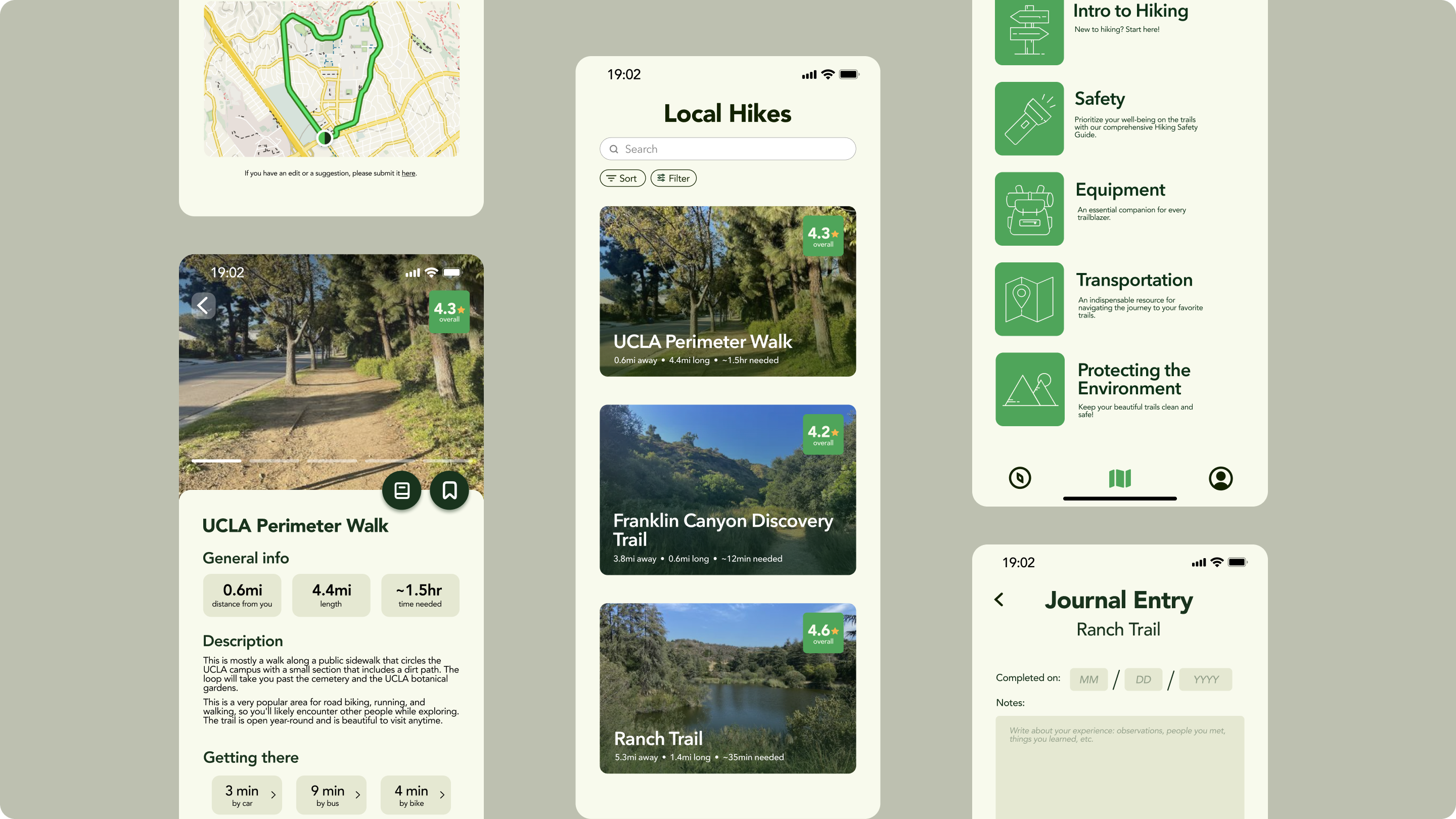
[The user signs up and is brought to the home page, which shows them a list of hiking trails near UCLA, sorted by distance. They can click into each trail to view the trail details, such as duration, how to get there, map, etc. Going to the guides page, they are able to read each guide to learn more about the world of hiking. Users can save trails and guides as well. Their profile shows their saved and completed hikes.]
Initial design
For our initial idea, we included a homepage that displays local hikes, which the user can choose to organize based on various features of the hike which could be highly useful for beginner hikers. The features we plan to include are as follows:
- Hike details including: duration/length of hike, difficulty of hike, elevation, etc.
- Location of hike from the user
- How crowded/popular the hike is
- Water/bathroom access
- Parking/public transportation
- Shade/forecast
- Accessibility
- Optimal time to go on the hike
- What to bring/what to wear
There’s also a user profile that displays the user’s saved hikes, journal, experience level, and completed hikes. The experience level and completed hikes feature in particular will be especially important for beginners because it motivates users by showing their progress and growth over time. We also included guides that will inform beginner hikers on relevant topics such as how to get started with hiking, safety, equipment, ways to protect the environment while hiking, and transportation. Users also have a personal journal displayed on their profile page, where they can log their experiences on each hike, as well as add images of views and wildlife they took along the hike. Journal entries can also be shared to the public, allowing users to read first-hand experiences from other beginner hikers from their profile or on individual hike guides.
During our weekly check-in, we received the following feedback: The survey when creating an account isn’t necessary, just assume users are beginners. Don’t need location services, as it’s supposed to be just for UCLA students finding hikes near UCLA. Don’t focus on the social aspects for now.

Usability testing for final designs
To start off our interviews, we asked some general questions about the participants’ experiences with hiking and hiking apps. We found that most of them don’t really use a hiking specific platform to discover new trails or locations to explore, they either search on Google, TikTok, Youtube, or hear from friends. All of them have never used an app or website to learn about hiking or trails as well. When asked if they would use such platform that also contains detailed hike guides, those who are actually interested in hiking said yes.
Having an app like this would make it easier for them, as “doing research on my own and all of those scattered hiking places are confusing. An app that’s only for hiking around UCLA will be really helpful… to have more interest in hiking.” The participants would love to engage in this platform since it would be “more convenient to partake in this activity” as well.
Next, we asked the participants to interact with our prototype and provided some user tasks for them to perform to gain an understanding of the general flow. These tasks included signing up, exploring hikes in the home page, exploring the general hiking guides, and viewing the profile page. We followed up with the participants by asking questions specifically about the hikes, guides, and profiles pages. Through their answers, we were able to gain valuable insight on ways to improve our app.
After the participants interacted with our prototype, we again asked them some general questions concerning their experiences. They all thought that the app was very easy to navigate, as it was well structured and had an appealing layout. This led us to find that they themselves would use this app to discover new hikes as it contains all the information in one platform already, and since it contains the guides, it is very accomodating to beginner hikers.
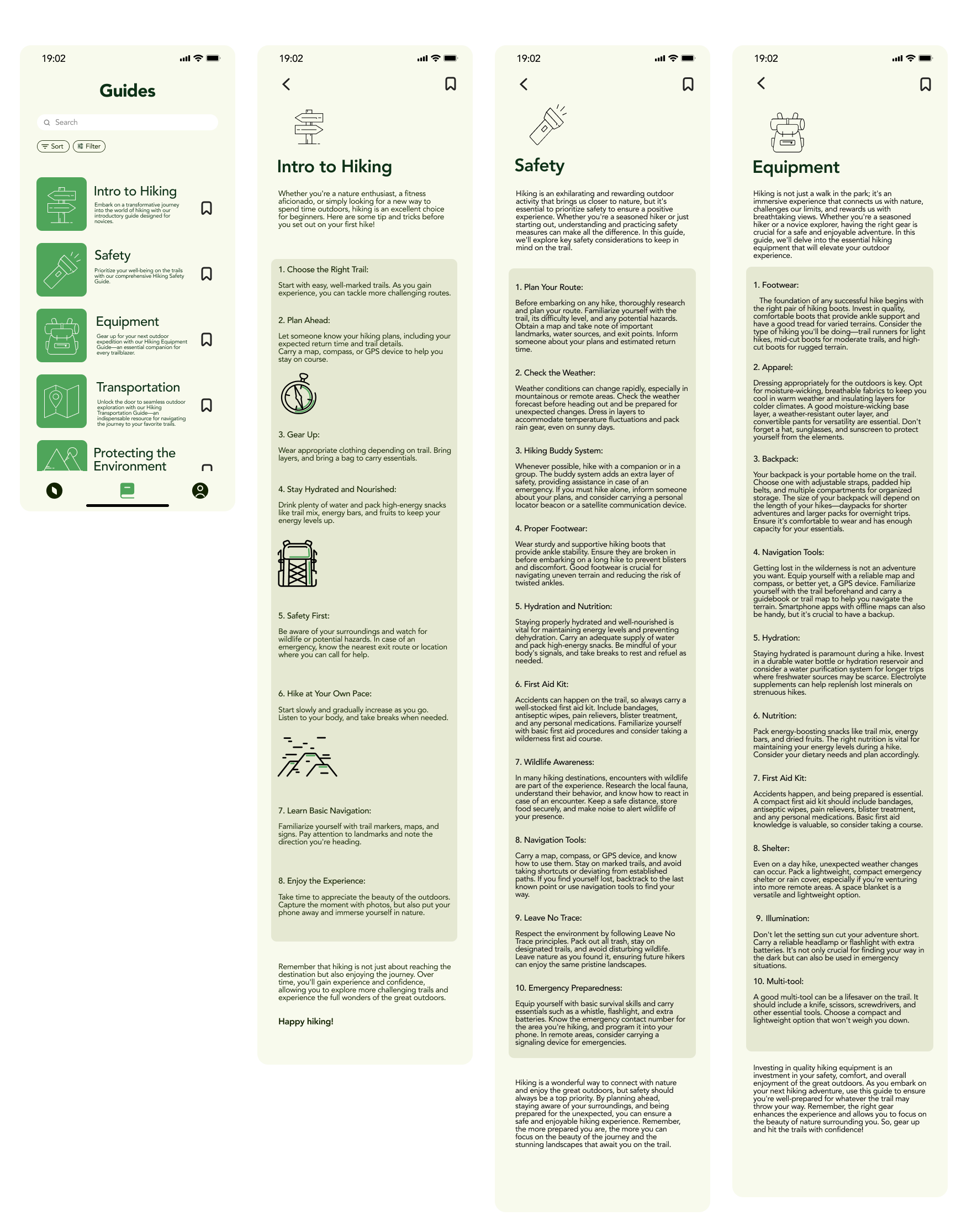
Concerning the visual design and overall aesthetics of the app, the participants all liked how it is very simple, comfortable, and clean. One concern was the dense wording of the guides, and how text heavy it was. They would’ve liked to have images or short videos, something more engaging rather than having to read such a long article.
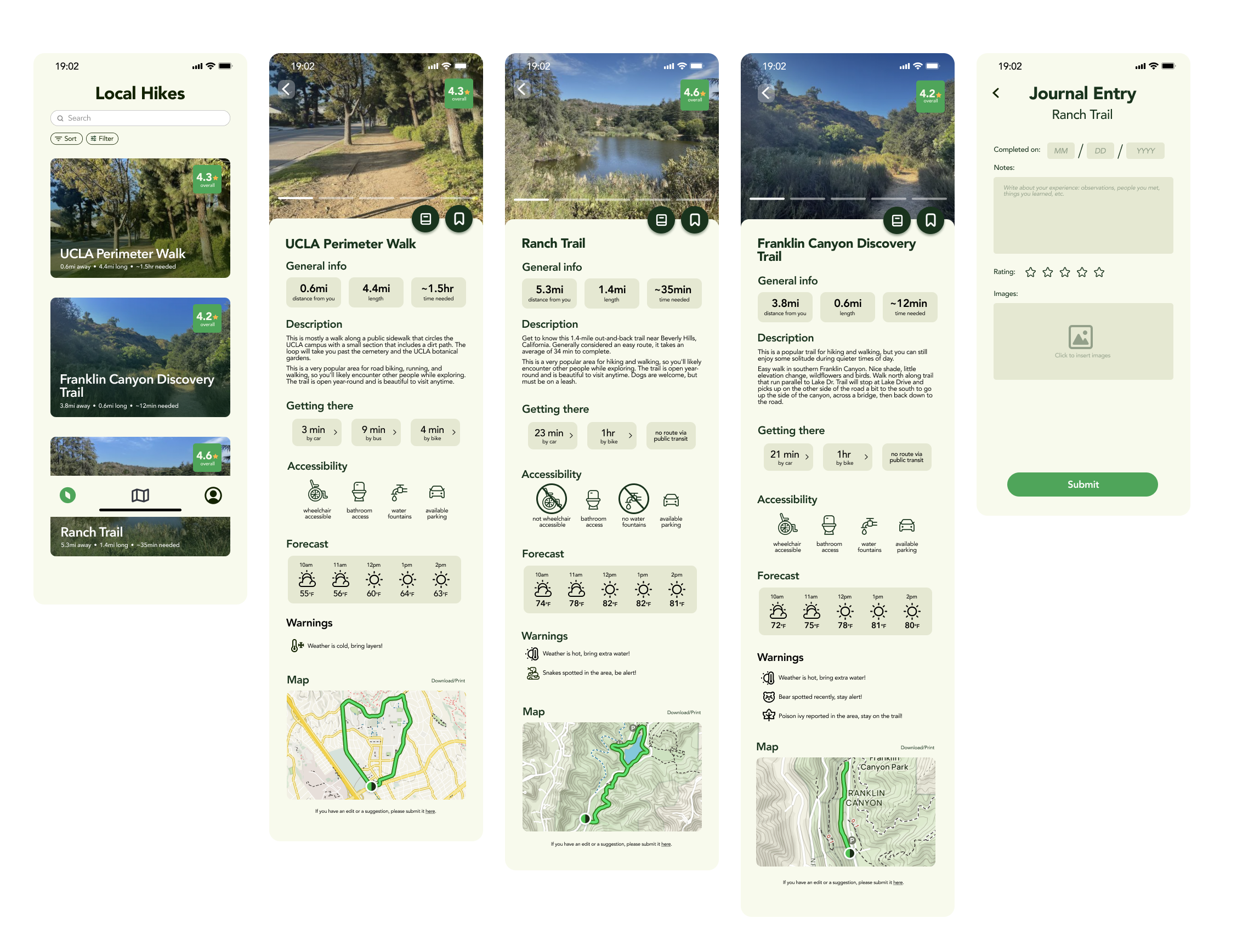
With the feedback, we made the following revisions:
- Adjusted trail details pages
- Guides less wordy
- Got rid of journal (combined with completed trails)

Future considerations
One thing we also discussed was having more user interactions, allowing them to input or change any existing information on the trail detail pages. As they would experience it first hand, it would be nice if they could input information real time, as well as upload their own pictures to be displayed on the trail page.
At the end of this project, the biggest takeaway I learned was how to work in a group. As most of my previous projects were done solo, working with a group with people of different backgrounds and skill levels was definitely a learning experience for me. Obviously there were clashing thoughts and opinions throughout the process, as well as an unbalanced work distribution. Although at times I got really frustrated due to miscommunications, I learned how to effectively resolve these issues, and in the end come out with the final product, HikeU.